
Six Game Registration – Create Your Account
Six Game registration is the first step for users who want to access the platform and manage their accounts. The registration process is available through the app or browser version, allowing users to create an account from supported devices.
If you are new to Six Game Apk, this guide explains the available registration methods, the information you need, and how to log in after creating your account.
What Is Six Game Registration?
Six Game registration is the process of creating a new player account on the platform. Once registered, users can access their account, explore the available game categories, and manage their profile through the platform dashboard.
You can register using an email address or phone number. The platform also provides password-based and verification-code registration options.
Requirements Before Registering
Before starting the Six Game registration process, prepare the following:
- An active email address or phone number.
- A stable internet connection.
- A supported device, such as an Android phone, iPhone, tablet, or computer.
- A strong password if you choose password registration.
- Access to your email inbox or phone to receive a verification code.
You should also review the platform's user agreement and age requirements before creating an account.
How to Register on Six Game
Creating a Six Game Apk account is straightforward. Open the platform through your browser or installed Android application and follow the registration instructions displayed on the screen.
Step 1: Open the Registration Page
Visit the Six Game registration page using the referral link provided above. You can access the platform through a compatible browser or the Android APK.
Step 2: Choose Your Registration Method
The registration screen provides different ways to create an account. You can choose between email or phone number registration, with either a password or verification code.
Step 3: Enter Your Details
Provide the active email address or phone number you want to associate with your account. If you select password registration, enter a strong password. If you select code registration, enter the verification code received through your selected contact method.
Step 4: Accept the Registration Terms
Review the user agreement and age consent requirements. Select the required confirmation boxes only after understanding and accepting the terms.
Step 5: Complete Registration
Follow the instructions displayed on the registration screen to finish creating your account. Once registration is successful, you can use your account details to access the Six Game login page.
Available Six Game Registration Methods
Six Game provides four registration options, giving users flexibility when creating an account.
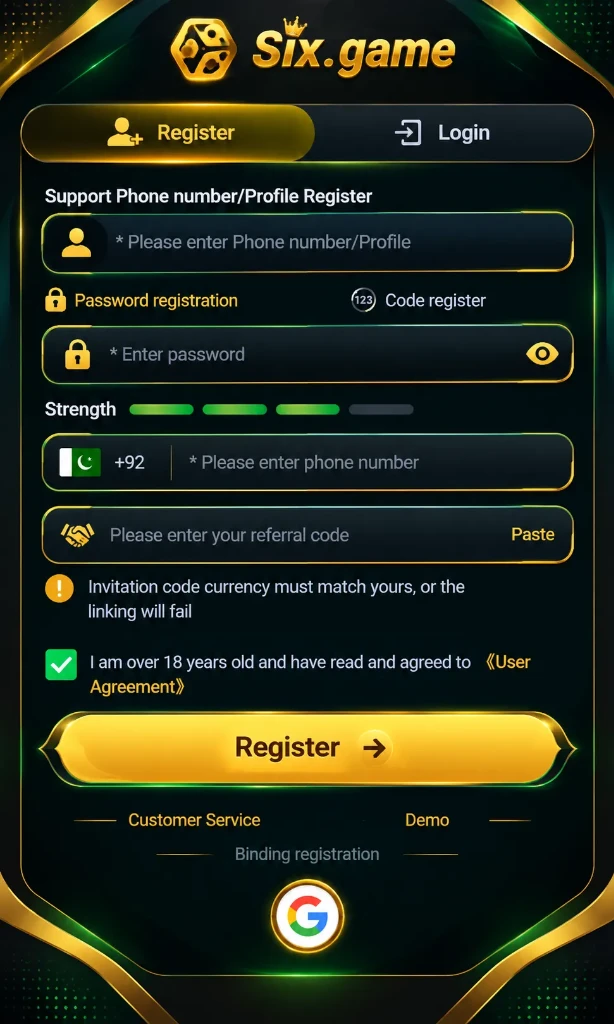
Email and Password Registration
- •Enter an active email address.
- •Select password registration.
- •Create a strong password using letters and numbers.
- •Accept the required user agreement and age consent.
Email and Verification Code
- •Enter your active email address.
- •Select code registration.
- •Check your inbox for the verification code.
- •Enter the received code and complete the required confirmations.
Phone Number and Password
- •Enter your active phone number.
- •Select password registration.
- •Create a strong password.
- •Accept the required registration terms.
Phone Number and Verification Code
- •Enter your active phone number.
- •Choose code registration.
- •Receive and enter the verification code.
- •Complete the registration instructions shown on the screen.
The available options may depend on the registration screen presented by the platform.
How to Log In to Six Game Apk After Registration
After creating your account, you can access it using your registered email address or phone number.
Follow these steps:
- 1Open the Six Game login page.
- 2Enter your registered phone number or email address.
- 3Select the supported password or verification-code login option.
- 4Enter your password or received code.
- 5Select the Login button to access your account.
If you are using a personal device, you can select the remember-password option when available. Avoid using this option on shared or public devices.
What If You Forget Your Six Game Apk Password?
If you cannot remember your account password, check whether the registration or login screen provides a Forgot Password option.
You can generally follow these steps:
- 1Open the Six Game login page.
- 2Select Forgot Password.
- 3Enter your registered email address or phone number.
- 4Follow the password recovery instructions provided by the platform.
- 5Create a new password if the recovery process allows it.
- 6Return to the login page and access your account.
Keep access to your registered email or phone number so you can complete any required verification.
How to Keep Your Six Game Apk Account Secure
Account security is important when using an online platform. Follow these basic precautions:
- Use a unique and strong password.
- Keep your email address and phone number active.
- Never share your password or verification code with anyone.
- Avoid logging in on untrusted or public devices.
- Log out when using a shared computer or phone.
- Contact the platform's support team if you notice suspicious account activity.
Final Words
Creating a Six Game Apk account starts with choosing a registration method, entering your email address or phone number, and completing the required verification steps. You can then use your registered details to log in through a supported device.
Before registering, review the platform's terms, age requirements, and account policies. This Game includes real-money gaming features, which involve financial risk. Participation should be limited to adults where legally permitted, and there is no guaranteed income or winning.